Spec-to-Stack Runtime How-To
Spec-to-Stack is the golden ValkyrAI application path:
- Design or compose an OpenAPI spec.
- Create an Application record with first-class bundles and build profile.
- Generate the ThorAPI app server, generated clients, and customer console.
- Deploy a slim generated tenant runtime.
- Inspect the running app through Swagger UI and REST endpoints.
- Open the project in ValorIDE, edit it, push to GitHub, then request a hosted pull deploy.
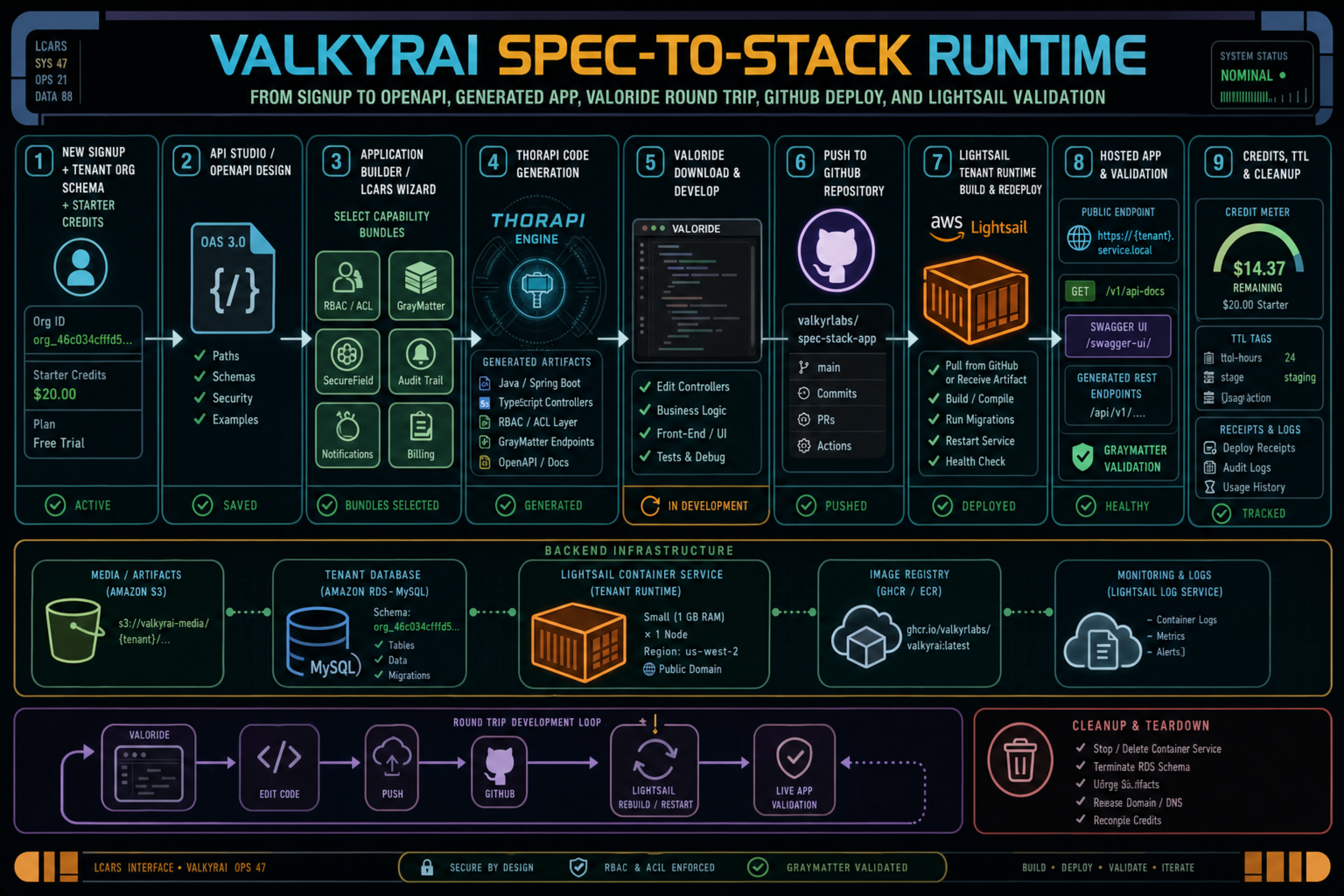
What Gets Created
| Object or artifact | Purpose |
|---|---|
Application | Owns the generated app name, slug, package namespace, OpenAPI spec, capability bundles, source-control bindings, and build profile. |
OpenAPISpec | The canonical ThorAPI source for generated models, controllers, clients, docs, and tenant REST endpoints. |
CapabilityBundle[] | Structured bundle objects such as GrayMatter, Workflow Designer, API Visualizer, CRM, or RBAC. Do not encode bundle ids in descriptions. |
ApplicationBuildProfile | Declares the runtime template and build strategy, such as java_spring_boot, nextjs_fullstack, controlled_builder_image, or lightsail_source_pull. |
DeploymentSpec | The requested deployment target, source repo, branch, commit, runtime template, build strategy, and LightSail/Fargate sizing. |
TenantRuntimeBinding | Connects the Application to a live hosted runtime, launch URL, tenant schema, deployment record, and data-plane scope. |
| Generated tenant runtime | A slim runtime that serves only the generated tenant app surfaces, not the full api-0 control plane. |
Customer Flow
1. Create the spec
Use OpenAPI Studio or the Application Wizard to create the spec for the app. A generated app without an OpenAPI spec is not a real app; the spec is the source for the ThorAPI model, REST controller, data tables, and generated client behavior.
If the user starts from a template or a vague prompt, ValkyrAI should compose a minimal spec from selected capability bundles. For example, the GrayMatter bundle can contribute memory and context endpoints, while RBAC contributes users, principals, roles, and ACL tables.
2. Choose bundles
In the Application Wizard, choose bundles as first-class objects. The Application payload should carry structured bundle objects, not text markers in the description.
Use bundles when the generated app needs:
| Bundle | Adds |
|---|---|
| GrayMatter | Memory/context data model, retrieval surfaces, validation endpoints, and bundle evidence. |
| RBAC + Users | Principal, role, ACL, and account management foundation. |
| Workflow Designer | Workflow definitions, execution state, triggers, and customer console modules. |
| API Visualizer | OpenAPI docs, schema browsing, and generated endpoint inspection. |
| CRM | Customer, lead, account, contact, and opportunity app objects. |
3. Review tenant shape
The wizard should show the app slug, table prefix, package namespace, selected bundles, deployment target, expected credit burn, and whether the account has enough credits.
Example app namespace:
Application slug: trustlove_relate
Table prefix: trustlove_relate_
Package namespace: com.valkyrlabs.trustlove_relate.model
Tenant schema: org_46c034cfffd542038ab64fec77e52c12
Core tenant tables such as principal, acl_entry, and organization live in the tenant schema for GrayMatter/RBAC bootstrap. Generated app tables should use the app slug or table prefix to avoid cross-app contamination.
4. Deploy
Use the Deployment Wizard or Customer Launchpad runtime controls. For LightSail, ValkyrAI should launch a generated tenant runtime image or the tenant-runtime harness while generated images are being productized.
Important production constraints:
| Constraint | Behavior |
|---|---|
| No full api-0 runtime | The hosted customer runtime must not launch the full ValkyrAI/API-0 control plane. |
| No visible secrets | Do not put JWT_SECRET, datasource passwords, API keys, or deploy tokens into LightSail visible environment variables. |
| Pullable image first | Validate the container image is pullable before reserving or debiting deployment credits. |
| Credit proof | Reserve before cloud work, debit only after success, release on failure. |
| Real runtime proof | A test run is not complete until a hosted REST data endpoint returns 2xx and selected bundle surfaces are validated. |
Inspect the Running App
Open Customer Launchpad and choose the generated app runtime.
Available runtime evidence:
| Launchpad action | API route |
|---|---|
| List generated apps | GET /v1/launchpad/apps |
| Create launch token | POST /v1/launchpad/apps/{applicationId}/launch |
| Runtime details | GET /v1/launchpad/apps/{applicationId}/runtime/details |
| Pause runtime | POST /v1/launchpad/apps/{applicationId}/runtime/pause |
| Resume runtime | POST /v1/launchpad/apps/{applicationId}/runtime/resume |
| Terminate runtime | POST /v1/launchpad/apps/{applicationId}/runtime/terminate |
| Request GitHub pull deploy | POST /v1/launchpad/apps/{applicationId}/runtime/github/pull-deploy |
Runtime details include:
runtimeUrlopenApiDocsUrlswaggerUiUrlhealthUrlbuildIdgitCommittenantSchemaOpenApiChecksum- runtime logs
- runtime events
- credit receipts
Swagger UI
Generated tenant runtimes expose Swagger UI at:
https://<tenant-runtime-domain>/v1/swagger-ui.html
The OpenAPI document is served at:
https://<tenant-runtime-domain>/v1/api-docs
Use Swagger UI to check generated endpoints directly. For a passing smoke run, verify at least one generated data endpoint returns HTTP 2xx. If the GrayMatter bundle is selected, verify GrayMatter appears in the tenant API docs or bundle-specific validation endpoint.
ValorIDE Round Trip
The hosted runtime is not the end of the workflow. It is the preview and runtime target for iterative development.
1. Open in ValorIDE
From Customer Launchpad, use "Open in ValorIDE Build Mode." The link carries runtime context such as:
applicationIdruntimeUrlopenApiDocsUrlswaggerUiUrl- app slug and package namespace
- tenant/runtime scope
ValorIDE downloads or opens the generated ThorAPI backend, generated clients, and editable app code.
2. Edit locally
Use ValorIDE for:
- frontend UX changes
- controller customizations around generated ThorAPI paths
- workflow and bundle wiring
- tests
- local builds
Keep ThorAPI-generated code as the backbone. If the model or REST contract needs to change, edit the OpenAPI spec and regenerate instead of hand-editing generated clients or generated controller contracts.
3. Push to GitHub
Push the edited project to a GitHub repository. GitLab support should use the same source-control binding model later.
The Application can store source bindings as structured objects:
sourceControlBindings:
  - provider: github
    repositoryUrl: <github-repository-url>
    repositoryOwner: acme
    repositoryName: trustlove-relate
    defaultBranch: main
    currentBranch: main
    currentCommitSha: abc1234
    status: active
4. Request pull deploy
From Customer Launchpad, submit a GitHub pull deploy request with:
{
  "repositoryUrl": "<github-repository-url>",
  "branch": "main",
  "commitSha": "abc1234",
  "integrationAccountId": "11111111-1111-4111-8111-111111111111",
  "buildStrategy": "lightsail_source_pull",
  "runtimeTemplate": "nextjs_fullstack"
}
The backend normalizes and records:
githubRepositoryUrlgithubDeployBranchgithubDeployCommitShagithubDeployBuildStrategygithubDeployRuntimeTemplatesourceRepositoryUrlsourceBranchsourceCommitShasourceIntegrationAccountId
The current runtime stays active while the worker fetches, builds, packages, deploys, and health-checks the candidate.
5. Worker completion
A pull-deploy worker result must include constrained steps. Raw shell commands, environment variables, and secrets are rejected.
Required successful steps:
fetch_repository
vaix_test
vaix_build
package_artifact
deploy_runtime
health_check
Only after health passes does ValkyrAI promote the runtime and debit the GitHub pull-deploy reservation. If validation fails, the current runtime is preserved and the reservation is released when possible.
Build Strategy Choices
| Runtime template | Recommended build strategy | Use when |
|---|---|---|
java_spring_boot | local_artifact or controlled_builder_image | Full ThorAPI Java app, SecureField, deep ValkyrAI capability. |
nextjs_fullstack | lightsail_source_pull or no_compile_runtime | Lightweight NextJS app/server generated from ThorAPI templates. |
nextjs_backend | lightsail_source_pull | API-first Node runtime. |
static_frontend | ci_artifact or static_assets | Static generated UI backed by hosted API. |
generated_tenant_runtime | prebuilt_image | Slim runtime harness for generated OpenAPI and bundle validation. |
For Java builds, prefer local or controlled builder output, then upload/promote the artifact. Running arbitrary Java compilation directly on the LightSail runtime is a later hardening decision because it expands the runtime attack surface and makes debugging harder.
For NextJS builds, source pull can be lighter, but the app will not have the same SecureField/full ValkyrAI capability until those templates are explicitly productized.
Credit and Cleanup Rules
Deployment should fail before burn if prerequisites are missing:
- bad OpenAPI spec
- missing tenant schema
- missing app record
- image not pullable
- AWS access preflight failed
- insufficient credits
- unsafe visible secrets
For live Cypress/spec-to-stack tests:
- Use cypress-prefixed test users and app slugs.
- Record initial balance.
- Reserve/debit only for real generation/deployment work.
- Prove hosted REST 2xx and bundle surfaces.
- Terminate the hosted runtime.
- Record final balance and receipts.
- Cleanup generated test users, Application records, deployments, and allowed test schemas through the guarded cleanup path.
Do not drop tenant schemas just because they look like org_<32hex>; real customer schemas use the same shape.
Troubleshooting
| Symptom | Likely cause | Fix |
|---|---|---|
| Application create fails before generation | Missing or invalid OpenAPI spec, stale bundle shape, or persistence issue. | Check app-generation logs and ensure Application.openAPISpec, capabilityBundles, and build profile are structured fields. |
| Deployment fails before LightSail work | Secret material, missing schema, bad image, AWS access failure, or insufficient credits. | Fix the validation error before retrying; do not reserve deployment credits until validation passes. |
| LightSail says port 8080 unhealthy | Runtime startup is slow, wrong port, wrong image, missing tenant schema, or health path mismatch. | Inspect LightSail logs, verify SERVER_PORT, image, /v1/health, schema, and datasource. |
| Swagger UI opens but endpoint fails | Generated runtime booted, but data endpoint or bundle route is missing. | Check /v1/api-docs for the path and verify the generated manifest includes the data path. |
| GitHub pull deploy is requested but not promoted | Worker did not report all required steps or health did not pass. | Inspect runtime details events and worker manifest. Current runtime should remain active. |
| Credits too low | Account cannot reserve the next operation. | Top up credits, then retry from the same app/deployment context. |
Operator Validation Checklist
Before calling a Spec-to-Stack run complete:
- Application has a real OpenAPI spec.
- Bundles are first-class objects.
- Build profile and source-control binding are structured.
- Tenant schema is ready and scoped.
- Hosted runtime is slim generated tenant runtime or generated app image.
- Swagger UI returns 200.
/v1/api-docsreturns the generated tenant OpenAPI document.- At least one generated REST data endpoint returns 2xx.
- GrayMatter bundle validation is present when selected.
- Credit reservation/debit/release receipts are present.
- GitHub pull deploy preserves the current runtime until health passes.
- Test/runtime cleanup receipts exist.